What TIRA insurance check is and why it matters
In Tanzania, the Tanzania Insurance Regulatory Authority, TIRA, runs a central system that records motor policies and the stickers placed on windscreens.
When you carry out a TIRA insurance check, you confirm if a vehicle’s policy is valid, when it started, when it ends, and which insurer issued it. This protects you from fake stickers and helps at checkpoints where officers ask for proof of bima ya gari.
We work with vehicles every day, so we treat verification as routine. Before a trip, we confirm policy details using official channels, then keep a screenshot or printout with the car file. The same habit helps private owners. A two-minute check can save hours at a roadside stop or during a claim.
TIRA’s verification options are simple. You can check online using the official TIRA MIS website, or use SMS where supported. Each method returns policy status and core details. If anything looks off, you contact the insurer immediately and correct it before you drive.
How to check insurance online, step by step
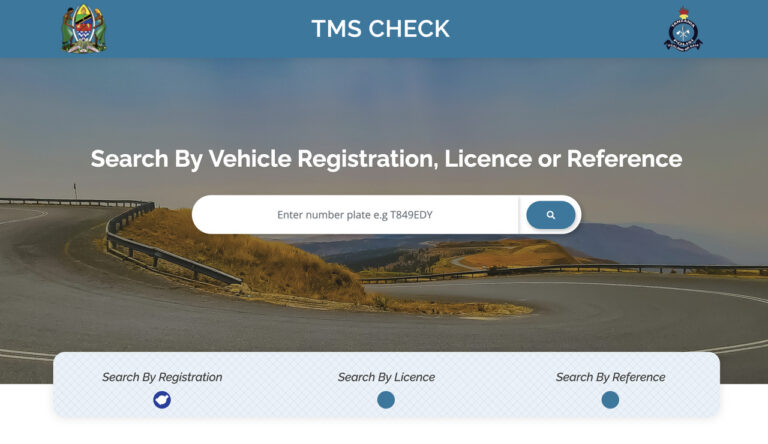
Go to the official TIRA MIS verification page. You will see a “Verify Insurance Cover Note” section with tabs for Registration number, Cover note reference, Sticker number, and Chassis number. Pick the identifier you have, enter it carefully, then press Verify. The page returns the policy status and core details.
You can search using any of these identifiers:
- Namba ya usajili, for example T123ABC
- Namba ya sticker on the windscreen
- Cover note reference number from your certificate
- Chassis number, sometimes written as VIN
Multiple community guides describe the same flow and fields you will see on the verification page. The interface is straightforward.
Read the result. A valid hit usually shows the insurer’s name, cover note number, policy type, and start and end dates. Treat “active” or an in-date range as good to drive. If the result says not found, check your entry for a typo and try a second identifier, for example chassis instead of registration. Community explanations of results align with the official page layout.
How to check by SMS
TIRA has promoted verification via SMS in addition to the web. Published notices and summaries explain that you send an SMS with the word STICKER followed by your motor insurance sticker number to the designated short code, then you receive policy details. This complements the web check and helps when data is patchy.
Tip, write the sticker number exactly as it appears on the windscreen label. If you get no reply, try again with a clear signal or fall back to the website. Keep the confirmation message on your phone for roadside reference.
What your verification result means
A clean match shows the insurer, transacting intermediary if any, policy dates, and policy type such as third party or comprehensive. Confirm that the vehicle registration and chassis numbers match your card and the sticker. If the policy is active today, you are compliant. If the end date has passed, renew immediately and recheck.
No record found can mean a typing error, a delayed upload by the intermediary, or a fake document. Try a second identifier, then contact the insurer’s service line for confirmation. Keep your receipts, cover note, and vehicle card close, in case you need to reconcile records.
Common mistakes to avoid
- Wrong plate format. Enter letters in uppercase with no spaces unless the page shows a specific format.
- Confusing O and 0 on chassis numbers. Cross check from the registration card.
- Using the wrong identifier tab. If the registration tab fails, try sticker or chassis.
- Assuming a physical sticker equals a valid record. Always verify in the system.
When to verify
- Before you drive a newly insured vehicle
- After a renewal, to confirm the new dates
- Before long trips or gate days, especially during rains or holiday periods
- When buying a used vehicle, verify first, then complete payment
Helpful extras
The regulator’s MIS also sits behind industry tools and awareness posts. Many local explainers mirror the official flow and remind drivers that verification takes moments. If you prefer apps, look for official releases from TIRA and check permissions before you install. The principle stays the same, you input an identifier and read a status tied to TIRA’s database.
Top 8 TIRA Insurance Check FAQs
Which identifier works best, plate, sticker, cover note, or chassis?
We suggest you start with the registration number because it is the quickest to type correctly. If the vehicle has had plate issues or a recent transfer, the sticker number is often the most reliable because it ties directly to the current policy. For older vehicles with unclear stickers, the chassis number helps because it rarely changes. The official page supports all four and returns the same core details either way.
Use two identifiers when you want full confidence, for example plate and chassis. If the two results align on insurer, dates, and policy type, you are looking at the right record. Save a screenshot for your file or glovebox.
The site says “not found.” What do I do next?
First, retype carefully and check whether you used O instead of 0 on a chassis, or mixed up letters on a plate. Try a second identifier tab such as sticker number. If you still get no result, contact the issuing insurer with your cover note and receipt. Upload queues or data entry delays can cause gaps for a short period. The portal is the source of truth, so wait for a clean match before you rely on the paper.
If you suspect a fake document, do not drive. Report the case to the insurer and the regulator, then obtain a legitimate cover. Verifying early prevents roadside stress later.
Can I check insurance without internet?
Yes, use the SMS option where available. Send the word STICKER followed by your sticker number to the designated short code. You will receive a reply with policy status and core dates. Keep the text for checkpoints. If the SMS does not return a message, move to an area with better signal or use the web page when possible.
Network hiccups happen during storms or power issues. A second attempt usually works. For long trips, verify the day before so you are not dependent on reception at the last minute.
What details should I confirm in the result?
Match the insurer name, cover note number, policy type, and validity dates. Then check that the registration and chassis in the result match your card and the car. If any identifier differs, raise it with the insurer before you drive. Minor typos should be corrected in the system so future checks align with your documents. The verification page exposes these fields clearly.
Keeping a photo of your card and the sticker helps you compare quickly. Organization beats memory at a checkpoint.
How often should I recheck my policy?
Check on renewal day, after any midterm change, and before long trips or park gate days. If your vehicle changes plates or ownership, verify again once the insurer updates the record. A quick monthly check takes seconds and catches lapses early. Industry explainers encourage routine use of the portal for this reason.
If you manage a fleet, save verification screenshots in a shared folder sorted by plate and month. That habit makes audits and roadside questions simple.
Does a valid sticker guarantee a paid claim?
A verified policy proves that cover exists for the period shown. Claim outcomes still depend on the policy type, terms, and circumstances of the incident. Always read your cover note for exclusions and obligations such as reporting timelines or authorized repairers. Verification complements, but does not replace, careful reading of your policy. General guidance points to TIRA MIS for authenticity, not claim guarantees.
If you have a complex risk, discuss it with your insurer before you drive. Written confirmations help later.
I bought a used car. What should I verify besides the policy?
Verify the policy on TIRA MIS, then cross check chassis and registration against the card and the vehicle itself. If the seller claims comprehensive cover, make sure the result shows that policy type. Confirm the expiry date and ask for the latest receipt. If identifiers do not match, ask the insurer to correct the record before you complete ownership transfer. The TIRA page makes these mismatches easy to spot.
Keep copies of all documents. When you visit TRA or a test lane, a tidy file speeds the day.
Is there an official app for verification?
TIRA has promoted digital verification via its MIS, and there are Android listings that present a TIRAMIS checker. If you prefer apps, review the publisher details and permissions, then test with a non sensitive query. Many drivers still use the website or SMS because these options work on any phone and are easy to show at the roadside.
tiramis-iqi.en.softonic.com
If you install any app, keep your device updated and avoid third party stores. The browser method remains the simplest and most universal.
Conclusion
A TIRA insurance check is quick, free, and essential. Use the official TIRA MIS page to verify by registration, sticker, cover note, or chassis, then keep a screenshot with your car file. When data is limited, use the SMS option with your sticker number. If a result does not look right, pause and contact the insurer until the record matches your documents. These small, steady habits make roadside checks and claims simpler for everyone.